
new
Ad Manager
Engagement and Sales campaign statistics
👀 What’s New?
We’ve expanded the
Ad Manager statistics
section to now support performance data for Sales
and Engagement
campaigns - previously only available for Leads and Traffic objectives.👷 How It Works:
- Under Ad Manager Statistics tabof Ad Manager, we can see the campaign performance details.
- In the "Results"column of campaign statistics, users will now see outcome data for:
- Engagement ObjectivewithMessaging Appsas the conversion location
- Displays the number of people who started a conversationthrough the ad.

- Sales ObjectivewithWebsite and/or Messaging Appsas the conversion location
- Website: Displays the number oflink clickson the ad.
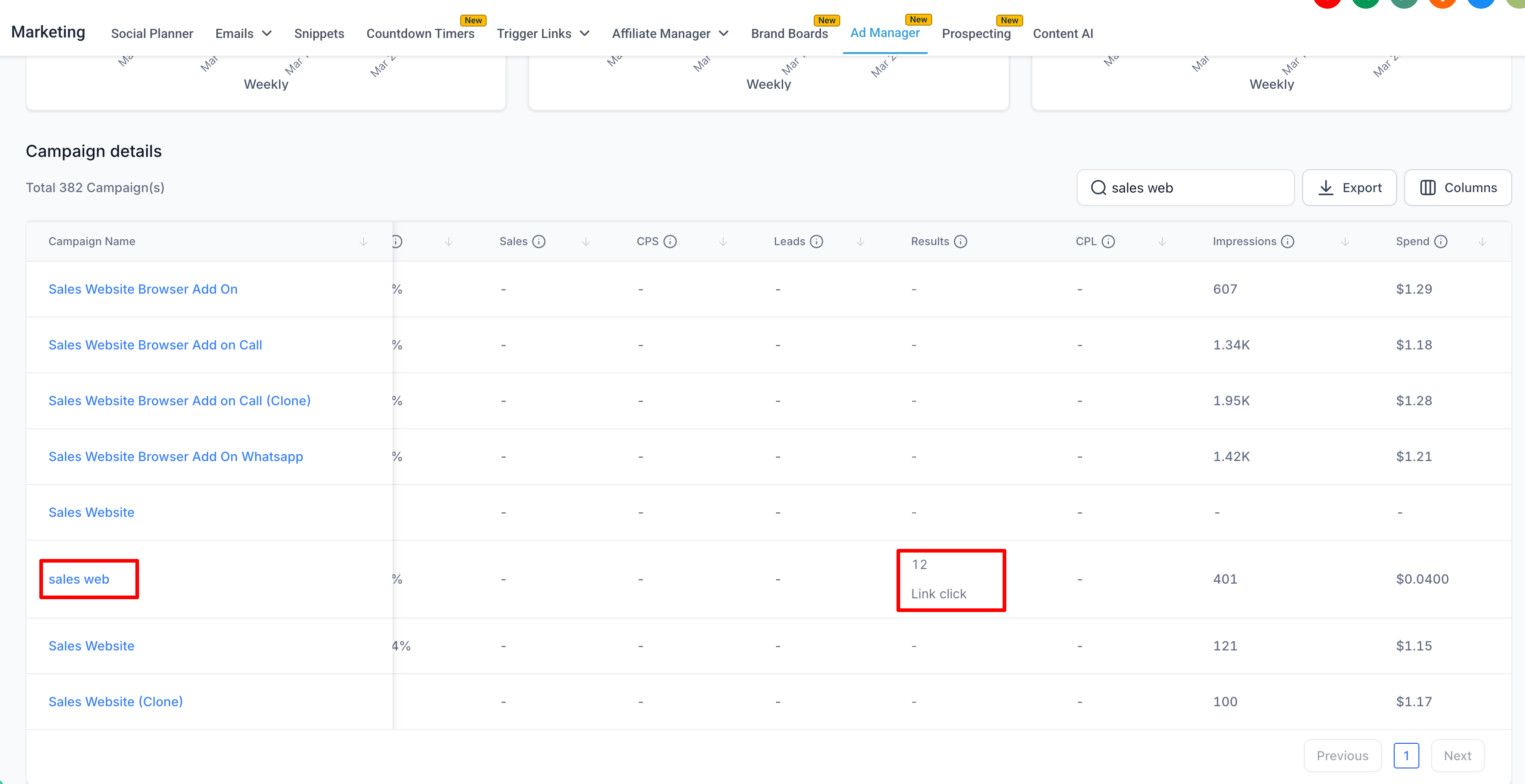
- Messaging Apps: Displays the number of people who started aconversationthrough the ad.

These values appear in the same familiar view under
Ad Manager Statistics > Campaign Details
, in the Results
column next to the other metrics for the campaign.⭐ Why it Matters:
- Helps users understand engagement-driven or sales-driven outcomeswithout switching tools.
- Allows for better performance comparisons across objectivesand more informed optimisation decisions.
📝 Notes:
- This update is specific only to campaigns created with SalesorEngagementobjectives. Other Meta objective metrics remains same as before working as expected.
- Stats reflect results reported by Meta and are updated in near real-time.